Forester Font for Web Design
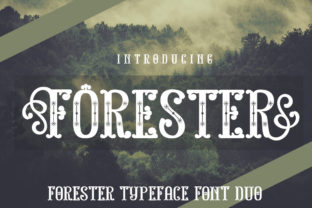
Forester is a bold display font that brings energy and personality to digital design. Its all-caps style and multiple alternate characters make it ideal for creating standout visuals across websites, landing pages, and brand materials.
As a web designer, I appreciate how Forester adds visual weight without sacrificing clarity. Its clean lines and strong structure make it suitable for headers, buttons, and other prominent elements where readability is key. The font’s versatility allows it to work well in both modern and editorial contexts.
Using Forester in Digital Layouts
Forester shines in hero sections, call-to-action buttons, and logo designs. Its uppercase form ensures legibility even at smaller sizes, making it a great choice for mobile-first layouts. When used in headers, it helps establish a clear visual hierarchy, guiding users through content with ease.
In online stores, Forester can be used for product titles or promotional banners. Its distinctive look draws attention without overwhelming the viewer. For creative portfolios, it adds a professional yet dynamic feel, reinforcing a brand’s identity with every page.
Brand Tone and Visual Hierarchy
The personality of Forester aligns well with brands looking to convey confidence and creativity. Its boldness makes it perfect for SaaS startups, coaching websites, or digital course platforms that want to project authority and innovation.
When designing for conversion-focused layouts, Forester can be used in CTA buttons to create urgency and impact. Its presence encourages users to take action, whether it's signing up for a newsletter, purchasing a product, or exploring a service.
Readability and Responsive Design
While Forester is a display font, it maintains good readability on various screen sizes. On mobile devices, it works best when used sparingly—such as in headings or short phrases. For small buttons, ensure there’s enough spacing between letters to avoid crowding.
On dark backgrounds, Forester remains legible due to its high contrast. When placed over images or gradients, consider using a semi-transparent overlay to enhance visibility. For body text, pair it with a simpler sans serif font to maintain balance and readability.
Font Pairing and Design Assets
Pairing Forester with a clean sans serif like Roboto or Open Sans creates a balanced design. This combination works well for landing pages, blog headers, and content sections where both style and readability matter.
For editorial designs, pairing Forester with a serif font like Georgia or Playfair Display adds depth and sophistication. This approach is effective for blog posts, magazine-style websites, or content-heavy pages that require a more traditional feel.
Practical Applications for Web Designers
Forester is ideal for creative portfolios, boutique online stores, and coaching websites. Its ability to stand out makes it a go-to choice for designers looking to differentiate their work. In digital ads, it helps capture attention quickly, increasing the likelihood of user engagement.
For course sales pages, using Forester in headlines and subheadings reinforces the value of the content. It also works well in social media graphics, where bold typography can drive clicks and shares.
Commercial Use and Licensing
When using Forester for client projects, online stores, or digital templates, ensure you have the proper commercial license. Most premium fonts include licensing options for web use, but it’s important to verify the terms before deployment.
For brand assets, including logos and marketing materials, check if the font supports multilingual characters. This is especially important for global audiences or businesses operating in multiple regions.
Forester’s availability in webfont formats like WOFF and WOFF2 ensures smooth performance across different browsers and devices. Including alternate characters gives designers more flexibility in customizing typography for unique branding needs.
Whether you're working on a personal project or a client’s website, Forester offers a powerful tool for creating visually striking and readable digital experiences. Its bold style and adaptability make it a valuable addition to any designer’s toolkit.